eve

macOS 14 and later · Apple silicon and Intel

Reclaim your disk.
Lose nothing you wanted.

A cleaner, disk analyser, app uninstaller and system monitor for macOS, written in Rust. It reaches the things a user-level cleaner cannot — and refuses the things that only look like cache.

  • Reaches further — the hibernation image, the unified log store, installer leftovers
  • Refuses what looks like cache — iPhone backups, Photos libraries, anything misfiled
  • Trash by default — and if the Trash is unavailable it refuses rather than deleting
  • Measures what a file really costs — allocated blocks, not the size a sparse file claims
  • Uninstalls the leftovers too — the bundle plus everything it scattered
  • One password, one session — root arrives on a pipe and dies when eve does

Free and open source · No account · No telemetry · Apache-2.0

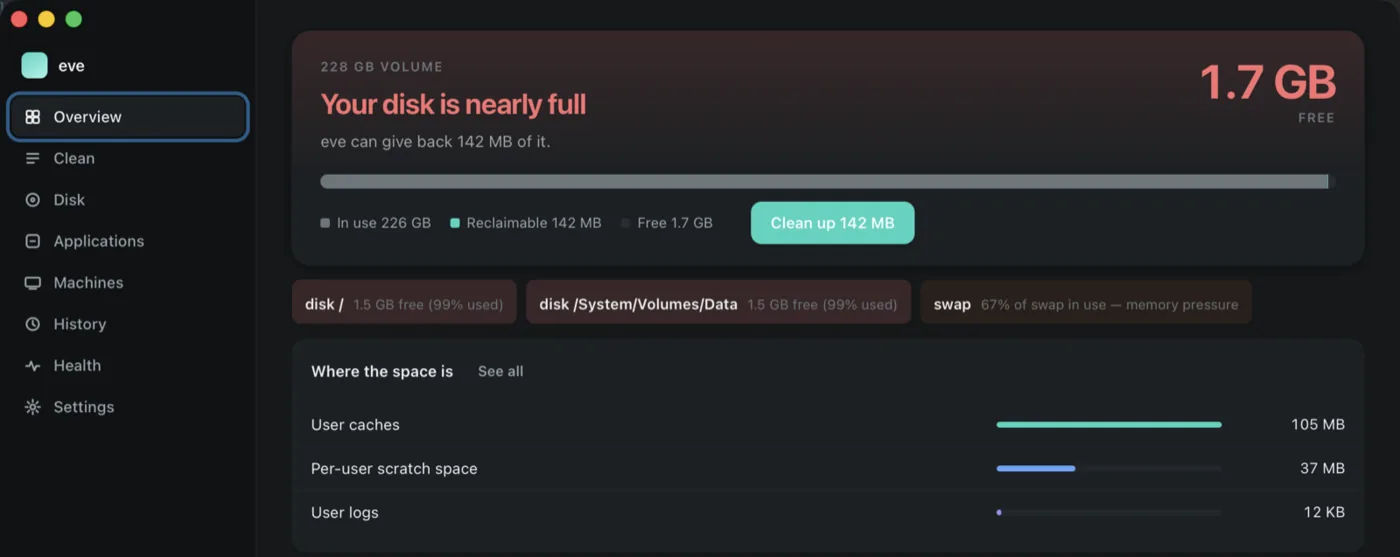
eve's Overview: a 228 GB volume with 1.7 GB free, 142 MB reclaimable, and a breakdown of where the space has gone.

A cleaner is only worth having if you can trust it with the risky part.

The space that is actually worth reclaiming does not sit in ~/Library/Caches. It is a sleep image the size of your RAM, a log store that grows for months, installer packages nobody deleted, and hidden directories on the data volume. Reaching those needs root — and anything holding root near your files has to be careful in a way that can be checked.

So every deletion in eve — from the command line, the app, an unattended run, or the root worker itself — passes the same five gates. There is no second path, and the root worker re-runs the whole funnel rather than trusting the verdict it was handed.

Clean

The categories a user-level cleaner cannot reach.

The hibernation image, the unified log store, leftover installer packages, Xcode's derived data, and the hidden directories on the data volume. Run it once to see the plan; nothing goes anywhere until you ask twice.

Every category carries a risk tier that belongs to the target, not to whoever is asking — so a forgotten flag cannot walk an unattended run into something dangerous.

$ eve clean
  preview only — nothing has been deleted

  User caches                     105 MB   safe
  Per-user scratch space           37 MB   safe
  Installer packages              1.2 GB   safe
  Unified log store               680 MB   privileged
  Sleep image                      16 GB   privileged
  iOS device backups            skipped   never-auto

  17.9 GB reclaimable

$ eve clean --execute --privileged

Machines

Listed, sized, and left alone.

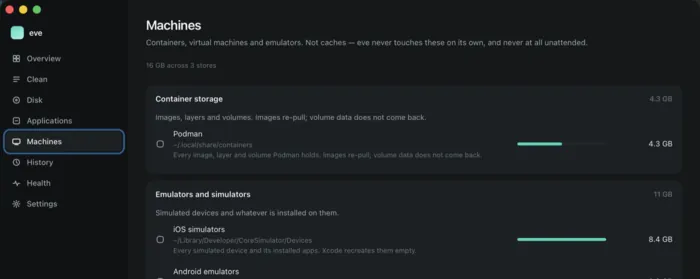
Docker images, VMs and iOS simulators are shown with what they really cost — but eve never touches them on its own, and never at all on an unattended run. They take real work to rebuild, so removing one is your decision rather than a heuristic's.

eve's Machines pane, listing container storage and simulator runtimes with their sizes.

Disk

Where the space actually is.

eve analyze measures allocated blocks rather than the length a file claims. It is the difference between a directory that reports 108 GB and a directory that is really costing you 4 — a sparse file, a clone, or a compressed one all lie in the same direction.

Which means the number you are shown is the number you would get back.

$ eve analyze ~/Projects

  4.1 GB  allocated      108 GB apparent

  2.6 GB   node_modules
  810 MB   target
  418 MB   .git
  240 MB   graphify-out

  sizes are st_blocks × 512 — what the volume
  gives back, not what the inode advertises

Applications

Uninstall the app and everything it scattered.

Dragging a bundle to the Trash leaves preferences, application support, caches, saved state, launch agents and login items behind. eve finds them, shows you the list, and removes the ones you keep ticked.

Anything an app left in a protected location is named rather than silently skipped, so you can tell a leftover that was removed from one that could not be.

$ eve uninstall "Some App"

  Some App.app                       412 MB
  ~/Library/Application Support/…     88 MB
  ~/Library/Caches/…                 140 MB
  ~/Library/Preferences/….plist       12 KB
  ~/Library/Saved Application State  1.1 MB
  ~/Library/LaunchAgents/….plist     820 B

  6 items · 641 MB · to the Trash

History

An append-only record of everything it ever removed.

What was deleted, when, how large it was, and under whose authority. A cleaner that cannot tell you what it did last month is asking for trust it has not earned.

There is a health view and a process list beside it, because the reason a disk keeps filling is usually still running.

$ eve history

  2026-08-29 14:02  clean        1.4 GB   user
  2026-08-29 14:02  trash        820 MB   user
  2026-08-27 03:11  autoclean    340 MB   agent
  2026-08-24 19:40  uninstall    641 MB   user
  2026-08-21 09:15  clean       17.9 GB   root

  append-only — eve never rewrites this file

The five gates

Every deletion passes all five, whichever surface asked for it — and the one place root lives passes them again on its own account. This is the part of eve worth reading before you run it.

Risk tiers

The tier is a property of the target. iOS device backups are never-auto: they are photos and videos, they are TCC-protected so they would measure as zero bytes, and no flag reaches them from an unattended run.

Tier What it covers Unattended?
safeRegenerable cachesYes
reviewAdjacent to user dataNo
privilegedNeeds root — sleep image, log storeYes
destructiveApp removal, system assetsNo
never-autoUser data misfiled as cacheNever
0tests
0gates on every deletion
0password, once per session
0bytes of telemetry

Get eve

There is no signed download yet. Building it is one command, and a signature that stays the same between builds is what lets macOS keep your Full Disk Access grant — so it is worth doing properly.

The app

The full window: overview, clean, disk, applications, machines, history, health and settings. Clone the repository, then build it and drag it to Applications.

scripts/bundle-app.sh
cp -R dist/eve.app /Applications/
Installation guide

Requires macOS 14+ and Rust 1.85+. eve asks for Full Disk Access on first launch and opens the exact Settings pane for it.

The command line

Every surface the app has, plus a full-screen TUI when you run eve with no arguments.

cargo build --release
cp target/release/eve ~/.local/bin/

eve permissions --fix
eve clean
Read the README

The CLI is a different program to macOS than the app, so it needs its own Full Disk Access grant — or point the background job at the app instead.

Unattended cleaning

A low-disk trigger that runs from a LaunchAgent, holds a pid-checked lock and enforces a cooldown so a persistent problem cannot re-fire forever.

eve agent install
eve agent      # what launchd runs
What it will not touch

It cannot reach destructive or never-auto categories whatever any config file says. That is structural, not a default.

Free, and it stays free

No licence tiers, no accounts, no upsell, and nothing phones home. If eve saved you an afternoon — or a disk — this is where you can say so.

GitHub Sponsors Patreon Liberapay Ko-fi Wise PayPal Stripe

Or star the repository — it costs nothing and it is how people find it. github.com/hartle-tech/eve